Preferences and accessibility
Language
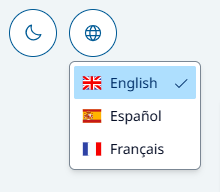
The SCL interface supports English, Spanish, and French. The selected language is saved in browser localStorage and reused until browser data is cleared.
Interface translation, briefing translation, simulated-customer language, and feedback language are related but separate:
- Interface labels come from the SCL translation bundle.
- Briefing and help content must be authored for the role-play.
- The simulated customer’s spoken language is defined by its SCAI configuration.
- Feedback uses the interface locale captured when evaluation starts: English maps to
en-US, Spanish toes-ES, and French tofr-FR.
Briefing fallback is exact locale → same language family → first valid entry. Help adds an English preference before its final first-entry fallback. Consequently, a missing translation can produce fallback content in a different language; SCL does not machine-translate role-play content.
Theme
The theme control stores the learner’s preference in localStorage. It does not affect role-play content or scoring.
Accessibility features
The current experience includes skip navigation, semantic controls, focus management, ARIA labels, keyboard operation for key dialogs and help, and visible focus styles. No completed formal accessibility audit is evidenced in the product repositories, so support for a specific compliance level should not be claimed without separate validation.
Accessible voice practice
- Use a headset when possible to improve clarity and reduce echo.
- Confirm the correct input and output devices before starting.
- Use the transcript as a supplement, not a guaranteed verbatim record.
- Keep browser zoom and operating-system text settings at comfortable levels.
- If microphone use is not possible, contact the learning owner; the current product has no text-only practice mode.