Troubleshooting
Start with the learner-visible symptom, then verify the earliest failed boundary in the flow: host launch, role-play loading, voice connection, transcript, or evaluation.

Common issues
| Symptom | Likely cause | Recommended action |
|---|---|---|
| Missing-parameter error | Iframe URL has no non-empty rolePlayId | Correct the launch URL and reload the iframe |
| No-token error | Parent omitted syntphony_V2V_token_submitted or its token | Wait for client-ready, validate the message shape, and send from the approved origin |
| Expired-token error | Refresh was empty, rejected, or took more than ten seconds | Implement the refresh round trip and return a current token promptly |
| Role-play remains unavailable | ID is wrong/inactive, SCAI agent is missing/inactive, session data is invalid, or authorization failed | Verify the active role-play/agent relationship and inspect the role-play GET status |
| Briefing remains in loading state | No usable localized briefing content reached the client | Verify locale content and the role-play response |
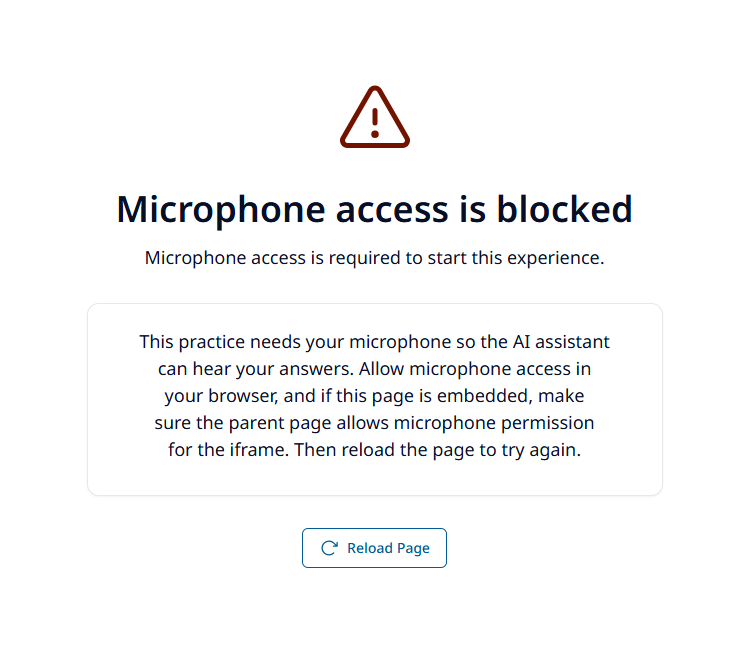
| Microphone error | Browser denial, missing iframe permission, insecure origin, or device policy | Grant microphone permission, add iframe allow="microphone", use HTTPS, and check device policy |
| Call never activates | SCAI credential, environment, DNIS, WebSocket, SDP, or media-path failure | Inspect the credential and signalling sequence; validate SCAI readiness and network access |
| Call drops repeatedly | ICE/WebSocket recovery is exhausted or the network/SCAI service is unstable | Check proxy, firewall, NAT/TURN, and SCAI availability; start a new attempt after recovery fails |
| Transcript is missing or inaccurate | Unsupported metadata, no-input recognition, or speech-recognition quality | Check SCAI metadata and audio quality; do not treat the transcript as a guaranteed verbatim record |
| Feedback-analysis error | No transcript turns, invalid locale/request, authentication failure, AI Factory error, or invalid evaluation output | Inspect the evaluation status and ProblemDetails; verify criteria and response validation |
| Recommended courses are absent | Evaluation returned an empty list; current core schema does not request courses | Treat courses as optional or extend and validate the evaluation design |
| Download opens a print dialog | Current export uses browser printing | Print or select Save as PDF |
| Host shows no completion | Completion was not configured, claims were missing, or background delivery failed | Verify target platform, upn, cmid, completion queue, retries, and LPI response |
| Analytics has no attempt | Tenant/runtime missing or token/session creation failed | Verify analytics enablement and session creation; do not infer learner failure from missing telemetry |
Microphone checklist
- Load both host and iframe over HTTPS.
- Include
allow="microphone"on the iframe. - Grant site permission in the browser.
- Select the correct operating-system input and output devices.
- Close applications holding exclusive microphone access.
- Check browser, device-management, and corporate privacy policies.
Network checklist
The learner’s browser must reach:
- The SCL static application.
- Evaluation and Integration Credentials APIs over HTTPS.
- The configured SCAI WebSocket endpoint.
- The WebRTC media path, including any required TURN infrastructure.
- The Role Play Evaluation API analytics proxy when analytics is enabled.
VPNs, TLS inspection, proxies, content filters, restrictive NAT, and firewall policy can affect signalling and media differently. A successful HTTPS page load does not prove that WebSocket or WebRTC is allowed.
Evaluation checklist
- Confirm the transcript contains at least one valid turn.
- Confirm
elapsedTimeSecondsis present and non-negative. - Confirm
Accept-Languageusesxx-XXform. - Confirm the role-play and its SCAI agent remain active.
- Confirm evaluation criteria exist and match the expected speaker mapping.
- Use the response status to distinguish validation (400), identity (401), not found (404), invalid AI output (422), and dependency failure (502).
- Do not automatically replay an evaluation request until duplicate completion/analytics effects have been assessed.
Safe support information
Provide:
- Environment and approximate timestamp.
- Role-play ID and analytics session ID, if visible to authorized operators.
- Browser/version, operating system, device type, and network context.
- Learner-visible error category.
- Sanitized request status, correlation identifier, and dependency state.
Never provide bearer or technical tokens, APIM keys, learner identifiers, transcript text, raw voice, or unsanitized request/response bodies.